Good To Go FAQ's

Here’s a selection of key information on Good to Go portal.

Here’s a selection of key information on Good to Go portal.

What is Good to Go?

Good to Go is Just You secure digital online tool that collects all travel information we need before your trip. This includes contact information, passport details and any special requirements. In this easy to use tool you can provide all your details and start your journey stress free.

General FAQs

What traveller information is being collected?

Good to Go collects the information necessary for any services booked on a tour.

Examples of the information we require include:

  • Emergency contact details

  • Relevant medical information

  • Proof of insurance

  • Passport information

Is this new information you’re collecting?

No, we’ve always collected this information. Up to now, however, this has been collected through a variety of sources and formats and sometime unclear to know what information to supply. Good to Go means that only the required information for your tour is collected in advance and it is visible to those travelling.

What are the benefits of Good to Go?

1. Improved service and safety. Collecting complete and accurate information from each traveller in advance will ensure we can provide your travellers with the best possible service at all times, while staying equipped to provide assistance during a critical incident.

2. One central tool. Good to Go allows travellers to manage booking requirements in one secure and central location.

3. Security. Good to Go is a secure way of communicating sensitive personal information. It’s a quick and secure way to submit your travel details online. It keeps all your important information in one place, saving you time and ensuring your travel documents are accurate and ready before you go.

4. Convenience. No need to wait on the phone or send us emails to provide required traveller information. All those travelling with us can access Good to Go at any time, 24/7.

5. More accurate information. You have direct access to your data. This reduces the chances of incorrect information and helps to ensure a seamless tour experience.

6. Tailored to your holiday. You will only be asked for information that is needed for your holiday, reducing you time in providing unnecessary information and limiting the amount of data supplied and stored by us.

Is completing the Good to Go process mandatory?

We ask that all customers complete the information. This ensures our teams have all the details needed to make all your holiday arrangements and take care of you while travelling with us. Missing information may impact on the enjoyment of your holiday and our ability to deliver all your holiday highlights.

How is Travelsphere going to handle the information provided?

The Just You privacy policy explains how we use and protect traveller information.

We also have safeguards in place to protect the sensitive data we receive during the booking process and through Good to Go. To help protect this information while the data is transmitted over the internet, we have implemented a high level of encryption.

Read our privacy policy at: https://www.justyou.co.uk/information/privacy-policy

When do we need to provide this information?

As soon as your booking is confirmed, you can begin adding and checking the information in Good to Go.

The deadline for submitting required information is directly related to your holiday. Many destinations have unique requirements for what information is needed and when. These timelines will be visible to you as ‘Due Dates’ in Good to Go.

Can someone other than my traveller complete the Good to Go process?

Another person, such as a Just You Holiday advisor, your the travel agent (if booked through a Travel Agent), or a fellow traveller on the booking can provide some of the necessary information through the Good to Go process on behalf of others. The persons Date of Birth will be needed to access information.

Details are showing but they have changed, what do I do?

If the Due Date has not passed, you can update Good to Go with your new details. If the Due Date has passed, you can email us on apis@justyou.co.uk.

We’ll make sure that our teams have all the information needed.

I have previously provided my passport details, but they don’t show in Good To Go?

Good to Go is tailored to the specific to the tour you are travelling on and in some case passport details such as number, expiry date and issue date are not required.

Thank you for providing this but if these fields are not required in Good to Go, you do not need to take any action – you are all set!

I have already provided my medical, mobility or dietary requirements and these do not show, what do I do?

Thank you for providing these and we are sorry these do not show. If the Due Date has not passed, you can update Good to Go with your details. If the Due Date has passed, you can email us on apis@justyou.co.uk  We’ll make sure that our teams have all the information needed.

Do I still need to check entry requirements for VISA’s and health requirements?

Yes. It is your responsibility to ensure that all passport, visa and health requirements are adhered to. Good to Go does not replace any local government requirements and these requirements can change at any time. Therefore, we recommend you regularly familiarise yourself with the latest requirements before you travel. If you cannot travel because you have not complied with any passport/entry/immigration requirements, we are unable to accept any responsibility.

We have partnered with Sherpa, an online self service tool that allows you to search up-to-date information regarding travel entry requirements for all countries and also allows you to apply for eVisas or eTAs via their online portal. Just click on this link to find out more – Travel requirement & Visa Service.

Good to Go - Hints & Tips

Accessing Good to Go

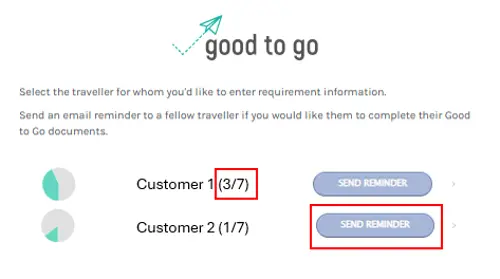
Each person that is travelling on the booking has their own profile to fill out. Once you’ve clicked on the Good to Go link for the person travelling, enter the passengers date of birth and the nationality selected or start typing in the box (eg British, Canadian, Australian). You’ll then see there is a number next to the travellers designating how many requirements have been completed (e.g. 2/9 requirements complete).

GTG-Image1.png

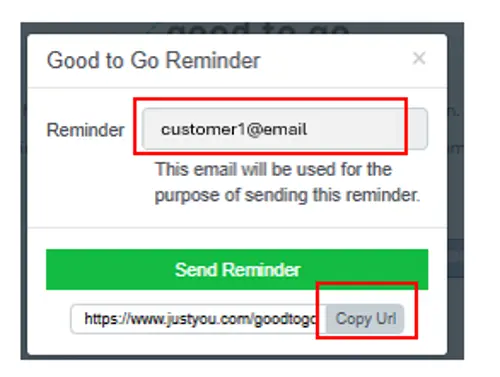
If there are other passengers on your booking you will be able to send them reminders, if we have their email address, so they can complete their information. You can also copy the url link and send it to them.

GTG-Image2-JY.png


Update and checking information

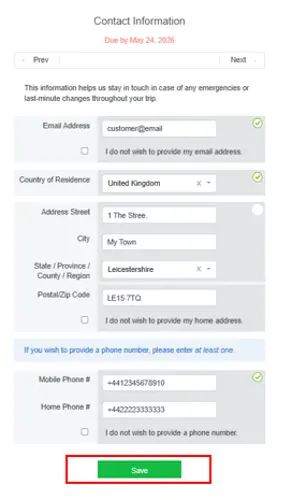
You can click on each section to update and check that the information is uptodate and correct. Next to the information is the due date, which is the latest date for you complete or update this information.
GTG-Image3.png

If the field is locked or the due date has passed and you are no longer able to add or edited yourself, don’t worry, just let us know using the Live Chat icon or drop us an email at apis@justyou.co.uk

How do I complete a section?

To complete a section do the following:

  • Enter the information required

  • Click the "Save" button

  • This will save for that specific section

  • Once you see the green checkmark, this indicates that section is completed

If the Save button is not showing green, please review each section and ensure all details are complete.

GTG-Image3.png

The Passport Section does not ask for my passport number, issue and expiry date, do I need to provide it?

One of the benefits of Good to Go is that we will only ask for details for the specific holiday you are travelling on. Some holidays we do not require these details and will not show in Good to Go.

If you have provided these details for previous holidays or this forthcoming holiday, this data will be stored securely and available if required for future holidays.

There is a section called Travel Documents, what do I need to do?

For some holidays, in order to meet local regulations and make arrangements for your holiday inclusions, we may require a copy of your passport.

All you need to do is take a picture of your passport page and email it to us on apis@travelsphere.co.uk. Once we’ve received it, our team will mark this section as complete. It may take 5-7 business working days for this to be completed.

Why do I need to complete the Medical Information section?

We want everyone to enjoy our holidays, so please let us know about any medical conditions, mobility needs, or dietary requirements. Since many of our holidays involve steady walking and time on your feet, sharing these details helps us find the best ways to support you and keep you safe.

If your health status changes after booking, just give us a quick update so we can keep things running smoothly. We’re here to help, so please reach out if you’d like to chat about your specific needs. This section may already be completed if you have spoken to one of our Holiday Advisors, just check that the details are all correct.

If you do not have any Medical, Mobility or Dietary requirements please tick the box next to the statement ‘I do NOT have any APPLICABLE pre-existing medical conditions.’

Why do I need to complete the Travel Ready section?

To ensure stress free travel and to avoid any unnecessary delays or costs, it is important that all customers travelling with us are aware of our Booking Conditions and to avoid any unnecessary costs or delays when travelling adhere to all entry and health requirements. By acknowledging this section you understand and accept our Booking Conditions. If you have made your booking over the phone with one of our Holiday Advisors, this may already be ticked following your acceptance of the terms & conditions.

If you have any questions, please do contact us via Live Chat or contact us

In Personal Information, I am being asked for Parka and Boot sizes, why is this?

On a limited number of tours, parka’s and/or boots may be provided to ensure you are suitably equipped to enjoy your holiday to it’s fullest.

We’ll ask for parka and boots sizes for all travellers.